In the initial phase of the scenario, the conductor hands the topographic maps to the participants inviting them to observe and try to interpret the morphology maps represent. He then illustrates to the participants the meaning of the graphic elements that characterize the map and, in particular, of the or contour lines that define the morphology of the represented territories.
Another important issue is the scale of the map, so the explainer after he will have explained this concept and the mathematical procedures to convert the lengths on the map to the real ones and vice-versa, he will list the most usual scale ratios used on topographic maps. The students will be parted in groups of two each of the will receive the usual material to draw an elevation profile (the copy of a map, graph paper, ruler and pencil).
Many web sites provides the user with copies of topographic maps of different places. To make the activity more engaging, we suggest you get some maps of the area where the school is based. For instance, this is a page of the Campania Region providing with maps of the Department of Naples: https://sit2.regione.campania.it/STWebGisApp/Map?idmap=mappa_carta_tecnica&layout-type=toolbar-top.
Furthermore, as an alternative to the use of traditional graph paper there are several websites that offer virtual graph paper: https://virtual-graph-paper.com/; https://incompetech.com/graphpaper/
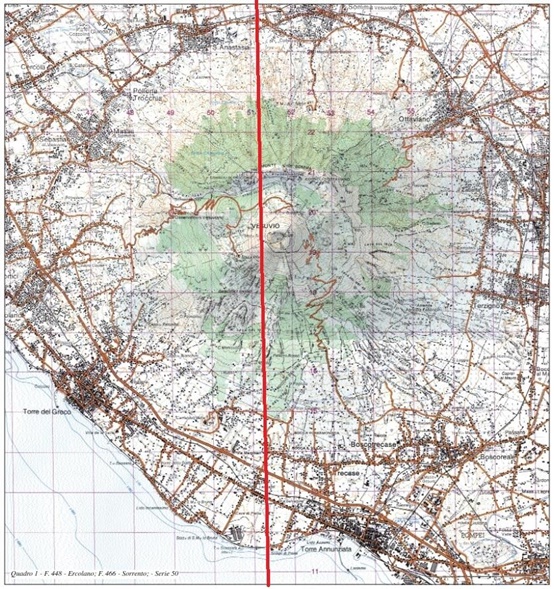

A traditional topographic map of Mount Vesuvius (above) with the track (in red) the elevation profile of which was obtained on the virtual graph paper (below).
After the students will have drawn their elevation profiles, they could get a feedback reporting the table of data they got from the topographic map (distances and altitudes) into an electronic spreadsheet and let the software make a scatter graph of these data. The trend of the graph will correspond to the topographic profile drawn previously on the sheet.
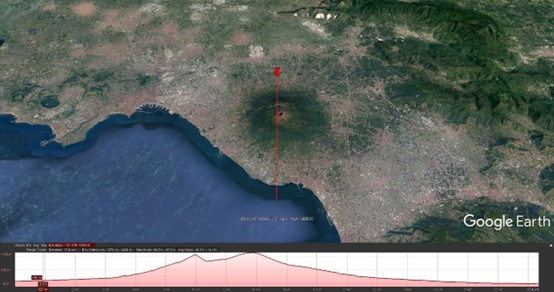
A similar feedback can be obtained through Google Earth Pro using the "ruler / path" option in the tools menu. By tracing on the application a path corresponding to the profile traced on the paper and choosing the "Show elevation profile" option, you will obtain a path like those obtained both on the graph sheet and from the spreadsheet
To obtain further confirmation of the trend of the topographical profile thus obtained, it is possible to repeat the experience by reporting on a pair of columns on the spreadsheet the data obtained from the topographic map (height vs. horizontal distance). The data can then be selected and reported on a scatter chart using the appropriate function of an electronic spreadsheet, its graphical trend will reproduce that of the topographic profile previously traced with traditional tools.
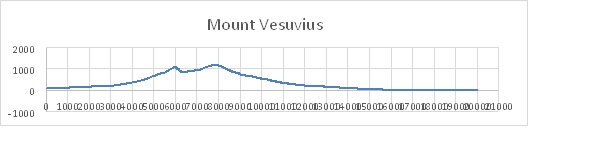
The elevation profile of Mount Vesuvius obtained from the scatter graph reporting the data gathered from the correspondent topographic map into an electronic spreadsheet.