


Hosted by OSOS , contributed by Alex Varela on 29 May 2023
In our school we are doing an important transformation regarding the program LfE. It implies the reorganization of three different rooms: IT room, Teachers lounge and Guidance Department offices.
First of all we already moved the previous IT space to a new one located in a different building on the second floor. The new space is bigger than the previous one and it will help us with the amount of students per class and also with the methodology. In the former IT space now we have the teachers lounge and it's also a better space for staff meetings, a relaxed space for meeting each other and a perfect place for working. We take some of our training courses in this place.
The new IT space was the previous Guidance Department office. We had to empty the whole room to reorganize the ideas about this classroom. Also the new Guidance Department office was the old teachers lounge. It is located now in a different building. Nowadays, with space reorganization, we have a cozy space to work with students and families which invites dialogue and cooperation, allowing the educational community to have better access to headteacher offices and other personal resources.
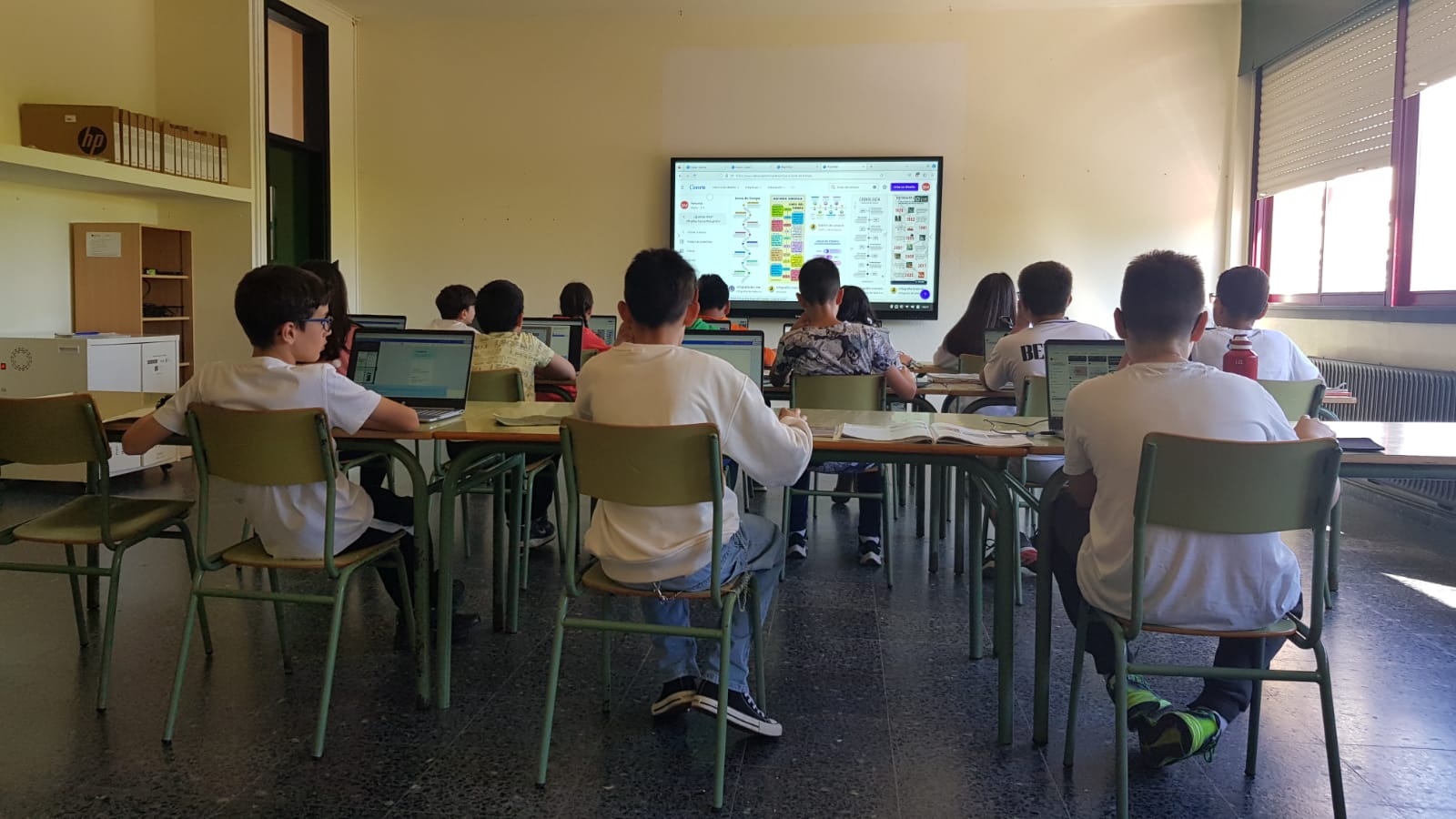
Regarding the new IT space, once the classroom was free of furniture, we decided to create 3 rows of tables with chairs, to move the laptops from the previous IT classroom, so the students will have enough space to work with.
In the front wall of the classroom we installed a 86¨ interactive screen, which is a great success for us because we can (and we already have) use this new space also as a conference room for the older students in the school. This new space allows us to implement interactive activities between the students and the person who is involved with them, improving their learning experience.
We use this space as a conference room for teachers (training courses) and parents too, due to the high performer characteristics of the equipment and the polyvalence of the classroom.
We decided to locate in the IT room all the technological devices from the school, so it could be more accessible for teachers and students to use them. We also have planned an allocated space for new items so we can conform to a highly equipped IT classroom.
We would like to provide new IT equipment to support the teacher’s learning approach and for this reason we purchased a Vivitek projector for a kindergarten classroom.
We decided to start this whole project as soon as possible because we consider the huge amount of benefits for our school but also because of the increase of the prices of the technology items we need to purchase, so we try to minimize the rise of the total cost.
We haven’t acquired more items due to the delay of the deliveries, expensive costs and lack of time. We expect to buy them during the summer so we can finish all the purchases planned.
In addition, we have a space in our website explaining about LfE project: http://www.edu.xunta.gal/centros/ceipmesonvento/?q=taxonomy/term/68
We have done dissemination from different newspapers about LfE project:
https://www.elcorreogallego.es/concellos/2023/04/23/colegio-meson-do-vento-lider-86365634.html
For the teachers, the most important impact is that now they are using the new sixteen laptops and the 86¨interactive screen in their lessons.
Everything is organized to allow working in a collaborative group and also individually, so the students can be focused on their individual tasks and, when necessary, they can be doing presentations to the all class in the interactive tv. So the teachers can increase the variety of activities proposed to the students.
On the other hand, the location of the new 86¨interactive screen helps the teacher to teach because now all the students can see it. In the previous classroom, for certain students it was difficult to watch the screen because of the characteristics of the screen and the classroom.
The new laptops have improved the speed, variety and quality in our activities, creating more opportunities every day, spending less time with the authentication, with the wifi connection etc, because all the computers are brand new.
For the students, the most important impact is that now they are using the new sixteen laptops and the 86¨interactive screen in their lessons.
They can attend lessons with a perfect view of the screen, so all of them are comfortable during the class time. Also all the students can count with a brand new computer which increases their interest in working with them because the new equipment responds easily to our students' necessities. They allow them to work in a collaborative group and also individually, with a higher processing speed and less connectivity issues, so they can progress at the same time during the session.
Moreover, they are using online tools more frequently such as Canva, Kahoot, some free tools like Libreoffice as a word processor and our virtual room attached in our webpage.
According to our former plan, all actions were settled correctly. We strongly believe that our pupils and teachers are increasing their digital skills but we need to take a further step where our school community has to be involved, which is considered our main challenge for the next school year and building international collaboration with “learning” schools.
Scenario title: Introduction of new online tools and free corporative software to upgrade the digital skills of the whole school community.
Rationale: The whole school community is facing the challenge of switching to e-teaching within days. This includes finding suitable learning platforms and tools, finding and/or creating digital learning content, introducing electronic communication tools and procedures, and many other tasks. Schools are urgently looking for free digital learning resources, which could simplify their lives in these uneasy for everyone days
Area of implementation: Supporting rural schools as community and educational spaces.
User groups addressed: Students, teachers, School Heads, Parents, Local administrators and public authorities personnel.
Specific goals: To provide increased opportunities related with the digital competence for the school community.
Connections with the curriculum: ITC, Science
Types of learning supported: Individual learning, Collaborative learning,Learning by doing, Community-based learning, Multidisciplinary learning.
Temporal mode: Time -dependent and time independent activity
Prerequisite competence: Teacher’s and students’ basic ICT skills
Applications involved: Internet connection, 86” interactive screen and 16 new brand laptops.
Narrative description: We are starting from scratch. After modifying some learning spaces and purchasing new devices, it is time to develop some training activities for teachers, parents and pupils. Once we get some competence on basic -medium ICT skills we can implement it with STEM Methodology and Robotics in our daily teaching.
Evaluation parameters: Evaluation should focus on how this innovative service is used by the teacher and the students and moreover, in terms of frequency and efficiency.